.png)
Connect your domain
To send flow emails as your church, GivFlow must send from a domain you control. Add the domain — usually the part after @ in staff email — then add the DNS records GivFlow shows. Without a verified domain, flows cannot send as the church. You can still use dashboards and statuses.
You must authenticate a domain before GivFlow can send as your church. Sender signatures are optional. For display names, see Branding and sender signatures.
Note: Automations also need a Church Center subdomain under Settings → Organization.
If you do not manage DNS, click Send. The person who receives the records does not need a GivFlow login.
Before you start
- You can open Settings in GivFlow.
- You know the church domain (the part after
@on staff email). - If someone else manages DNS, you will need their email so GivFlow can Send them the records.
Add the domain
- In the left sidebar, click Settings.
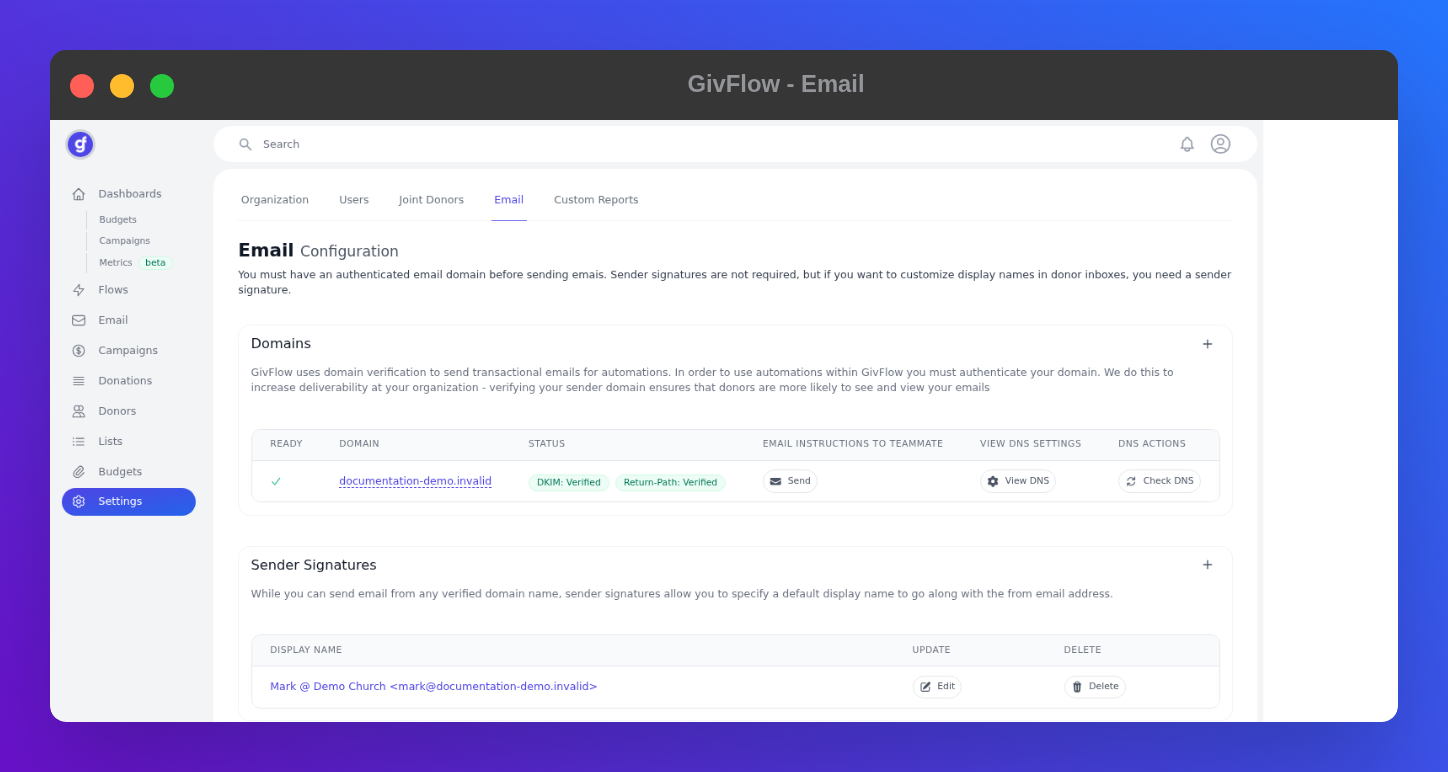
- Open the Email tab. The page title is Email Configuration.
- Under Domains, click + and add your church domain.
- Click View DNS. Copy Type, Name/Host, and Value from that list. Do not invent records.
On the domain row you will see Ready, Domain, Status, Send, View DNS, and Check DNS. When verification passes, Status shows DKIM: Verified and Return-Path: Verified, and Ready shows a check.
If someone else owns DNS
- On the domain row, click Send.
- Enter the email of the person who can change DNS.
- They receive the records. They do not need a GivFlow login.
Check DNS
After the records are at your host, click Check DNS. A ready domain shows a check under Ready, plus DKIM: Verified and Return-Path: Verified.
DNS can take time to propagate. If a check fails, look for typos or extra quotes, then try Check DNS again.
Add the records where DNS actually lives — see Add DNS records at your host. Optionally add a sender signature on the same Email page.
The sidebar Email item is not a composer yet. Domain connection stays under Settings → Email.